


Contacts
4.6232.00 Reviews
App Specs
- Version
- 31.0.0
- Updated On
- License
- Free
- Downloads
- 1,000,000+
- Developer
- KOFLEXI
- Categories
- Communication
- Platform
- Android
Screenshots
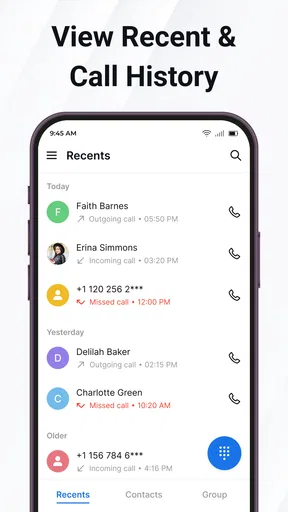
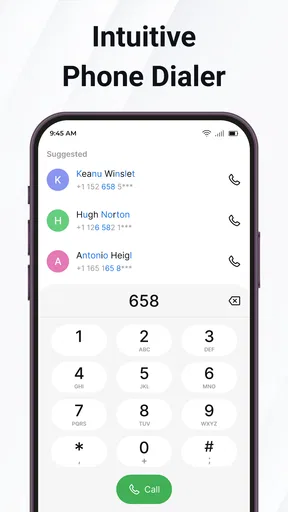
 Analysis by AppCompare
When I choose a contacts app, I care less about decorative flourishes than about how quickly I can find the right person, whether the details stay organized, and how much effort it takes to keep everything accurate. That’s the practical lens I’d use with Contacts: it is a free communication app from KOFLEXI, aimed at making a phone’s people list easier to manage and use for calls. Its appeal is strongest if your everyday needs are straightforward—look someone up, keep useful details together, and reach them without extra fuss.
Start with the job you need it to do
Before replacing the address book already on your phone, think about what causes friction now. If you regularly scroll through a long list, forget which number belongs to a colleague, or want a more deliberate way to arrange people, a dedicated contacts app may be worthwhile. If your built-in app already makes names easy to find and handles your calling routine well, switching may add little beyond another interface to learn.
I would also consider where your contacts live. A phonebook can draw on information connected to the device or accounts, and changing apps does not automatically mean every detail will behave identically. Before making a new app your everyday starting point, check a few important entries and confirm that the names and numbers you rely on are present and usable. That small test is more valuable than judging an address book by its first screen.
A better fit for everyday calling
Call Pro is positioned around the basic loop of handling contacts and calls rather than asking users to adopt a separate way of communicating. That makes it a sensible candidate for someone who wants a clear place to browse people and begin a call. The store identifies it as an app for contacts, and its focus is easy to understand: the address book should help you reach the person you need, not become a project of its own.
One useful way to judge any replacement is to try a real task instead of tapping around at random. Look up someone whose details you know, then see whether you can move from their entry to a call without losing your place. Repeat with a person whose name is easy to confuse with someone else’s. If those common situations feel less awkward, that practical improvement matters more than a long list of options.
Where a dedicated address book can help
I can see the attraction for people who keep separate circles in their lives: family, work contacts, neighbors, or people they call only occasionally. Keeping those relationships easy to distinguish can reduce the chance of reaching the wrong person, especially when you are in a hurry. A useful habit is to review an entry when you next speak to someone and correct any outdated detail while it is fresh in your mind. The benefit comes from maintaining a dependable list, not simply installing another app.
Call Pro has an average rating of 4.6 from around 6,500 ratings, with more than a million installs. That suggests it has found an audience, but I would treat popularity as a starting point rather than a personal guarantee: people organize their phones differently, and the best test is whether the app suits your own calling habits. It is rated for everyone and is free, so trying it is a low-cost decision in money terms, though the time needed to check your setup still counts.
Worth Reading Before You Choose

EA SPORTS FC Mobile 26 Is a Bigger Football Game, but It Takes Time

Flipboard Shows What News Apps Must Do Beyond the Feed

Switching to Android Auto Means Rethinking Your Driving Routine

Google Calendar Makes a Crowded Week Easier to Manage

Ludo King Makes the Most of the Minutes Between Plans

Baby Panda World Brings Quick Play to Modern Phones, but Its Game Library Feels Busy
Simplicity Meets Style
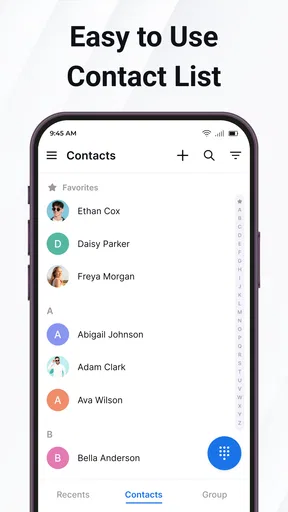
The first thing that strikes you about the Contacts app is its fresh, clean interface. Navigating through your contacts is as smooth as swiping through your favorite social media feed. The app has a minimalist design that doesn’t overwhelm you with unnecessary bells and whistles. Instead, it focuses on what matters most: making sure you can find and connect with your people effortlessly.
One of the standout features is the search functionality. You know those times when you can’t quite remember if you saved someone under their first name, last name, or a random nickname? This app’s search bar is forgiving and intuitive, allowing you to find your contact without breaking a sweat. It’s like having a personal assistant who knows exactly what you’re thinking.
Organization on Point
Now, let’s talk organization. I’m a fan of keeping things neat and tidy, and this app does not disappoint. You can create groups for different sets of contacts, like family, work, or that book club you keep meaning to join. This feature is super handy when you need to send a quick message to all your colleagues or check in with the family before the weekend.
Moreover, the app supports syncing across devices. So whether you’re on your smartphone or tablet, your contact list remains consistent. No more missing contacts or outdated info when you switch devices—everything is kept in harmony.
Customization Galore
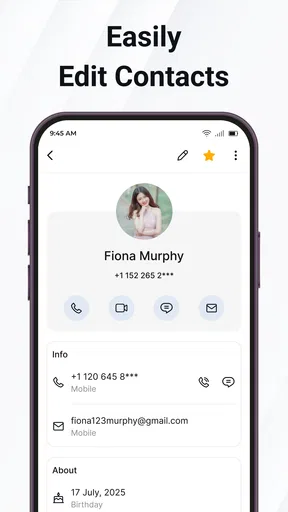
Who doesn’t love a little personalization? The app lets you customize contact profiles with photos, notes, and even birthday reminders. I mean, how else would you remember to send Aunt Sally a card on her special day? These little touches add a personal feel to your digital address book, making it more than just a list of names and numbers.
And let’s not forget about the integration with other apps. You can link your contacts to your email or social media accounts, making it easier to keep track of conversations and updates. It’s like having a mini social network right within your contact list.
Privacy is Key
In today’s digital age, privacy is a big deal. The Contacts app takes this seriously. It offers security features to ensure your data isn’t shared without your consent, keeping your information safe from prying eyes. Knowing that your contact list is protected gives you peace of mind, especially when you’re storing sensitive info.
And if you ever need to back up your data, the process is seamless. You can rest easy knowing that your contacts are safe in the cloud, ready to be restored whenever you need them.
Which kind of user should choose it?
I’d recommend Call Pro most readily to someone who wants an address book that feels organized and approachable, and who makes regular calls rather than relying entirely on messaging apps. It may also suit a person who likes adding context to people’s entries, because photos, notes, and reminders can make a bare number easier to recognize later. Those details are especially useful when a contact is important but not called often: a note can jog your memory about where you met or why you saved the number.
There are cases where I would stay with the phone’s default contacts app. If it is already tightly woven into your preferred calling, messaging, or account setup, replacing it may create needless duplication. Likewise, anyone looking for a full customer-management tool, a shared team directory, or a new messaging service should not mistake a contact organizer for those products. The useful question is not which app has the longest feature list; it is whether this one reduces the small annoyances you actually encounter.
Try it with a realistic routine
Picture a busy weekday: you need to call a relative while walking out the door, then later find a work contact whose name you have not used in a while. A practical trial is to search for both people, check that the right details are attached, and start the call from the relevant entry. If you maintain groups, consider whether they help you distinguish the circles you contact most. This tests several everyday steps without requiring you to reorganize your whole phone on day one.
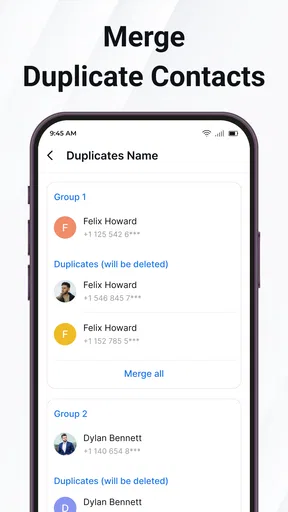
One non-obvious tip is to treat notes and profile details as a memory aid, not a dumping ground. Add only information that will genuinely help you identify the person or remember useful context. Overloading entries with stale reminders and scraps makes searching less helpful over time. Another sensible habit is to check duplicate or uncertain entries before editing them: when two records look similar, verify which number you use before merging or deleting anything in whichever contacts setup you rely on.
How it compares with the usual choices
The common alternative is simply to keep using the contacts app that came with your phone. That is usually the least disruptive route, especially if it already handles your everyday calls and account syncing. A dedicated option like Call Pro is more appealing when you want a different way to browse or organize people, but the value depends on the details of your own setup. I would not switch just because a new interface looks fresher; I would switch if a repeated task becomes clearer or faster for me.
Messaging apps are another tempting substitute because they show familiar people and recent conversations. They are convenient when the goal is to continue a chat, but they are not necessarily a complete address book for every person you may need to call. Conversely, a simple contacts app is not a replacement for the conversation history or group-chat tools of a messaging service. I see these choices as complementary: use the address book to keep a dependable route to people, and use the communication app that suits the conversation.
What to check before making it your default
For a calm transition, start by comparing a handful of entries you use often: a family member, a work contact, and someone whose details have changed before. Confirm that their names and numbers appear as expected, then try your usual route from finding a person to placing a call. If you depend on contacts across a phone and tablet, verify that the entries you need are consistent on the devices you use. The app’s support for syncing is useful, but a quick personal check helps catch account or setup mismatches before they matter.
Also consider the difference between storing a contact and protecting its information. The app is described as offering security features and cloud backup, which may be reassuring, but I would still be thoughtful about putting sensitive personal notes into any digital address book. Keep backup and account practices in mind, and avoid treating a contact profile as a private journal. That is a sensible trade-off: more context can make people easier to remember, while restraint keeps the information you store purposeful.
The version available is 31.0.0, and it requires Android 6.0 or later. KOFLEXI released the app on September 23, 2022, and it has 232 written reviews alongside its rating count. Those details give a sense of its place as an established utility rather than a brand-new idea, but they do not determine whether it will fit your device or personal preferences. If you are on an older Android version, the minimum requirement is particularly relevant; otherwise, I would focus on the hands-on checks that matter to your own contacts.
Switching without creating a mess
The main cost of changing contact apps is not the download; it is the possibility of confusion while you adjust to a different way of viewing the same people. I would avoid making several changes at once. Try Call Pro alongside your familiar routine first, learn where you find and edit entries, and only then decide whether it should become your regular starting point. Keeping the original setup available while you test makes it easier to retreat if an important contact behaves differently than expected.
If you have a long address book, use the trial to notice how you handle exceptions: contacts with multiple numbers, people you rarely call, or entries that need a reminder to distinguish them. Search can be forgiving, but good naming and careful editing still matter. No interface can reliably fix an address book whose records are outdated or ambiguous. A short cleanup of the people you contact most often will reveal more about the app’s usefulness than attempting to overhaul every old entry immediately.
Call Pro is free, which makes it easy to evaluate without paying for access, but I would not confuse a free download with zero commitment. You still spend attention checking how your list is handled and deciding whether the new workflow is worth keeping. Its everyone content rating makes it suitable for a broad audience, while the most satisfying use remains quite specific: people who want a more intentional, organized route to contacts and calls.
Final Thoughts
All in all, the Contacts app is a winner for anyone looking to streamline their contact management. Its user-friendly interface, robust organization features, and strong emphasis on privacy make it a must-have tool. Whether you’re a social butterfly with a bustling network or just someone who wants to keep their address book neat, this app has something for everyone.
If you’re tired of the clutter and chaos of managing contacts, give this app a try. You might just find it’s the solution you’ve been searching for, turning your contact list from a jumbled mess into a well-oiled machine.
My recommendation
My recommendation is to try Call Pro if finding people, keeping useful context beside their details, or separating personal and work contacts is a recurring nuisance. Give it a fair test with familiar entries and your normal calling routine, then keep it only if the change makes those tasks feel easier. If your current address book already fits your habits, or you need a shared business directory or messaging platform, the familiar alternative is likely the better choice. For a straightforward contacts-and-calls tool, though, this is an approachable option worth considering.
Pros
- Intuitive user interface for easy navigation.
- Seamless integration with cloud services.
- Customizable contact fields for personalization.
- Efficient search and filtering options.
- Supports multiple accounts for versatility.
Cons
- Lacks advanced contact grouping features.
- Occasional sync issues with some accounts.
- Limited integration with third-party apps.
- No dark mode available for night use.
- Ads may appear in the free version.
FAQs for Contacts
What features does the Contacts app offer?
The Contacts app provides a comprehensive platform for managing your personal and professional contacts. It includes features like contact syncing across devices, grouping contacts, adding detailed information such as addresses and birthdays, and integration with social media profiles. Additionally, it allows users to set custom ringtones and notifications for individual contacts.
Is the Contacts app secure and private?
Yes, the Contacts app prioritizes user privacy and security. It uses encryption to protect your data and offers regular updates to ensure the latest security features are in place. Users can also control app permissions to decide what information is shared or synced, ensuring that your contact list remains confidential.
Can the Contacts app be synced with other devices and platforms?
Absolutely. The Contacts app supports syncing across multiple devices, whether you're using Android or iOS. It can also integrate with popular email services like Gmail and Outlook, ensuring your contacts are always up-to-date regardless of the device or platform you’re using, making it highly versatile.
How easy is it to migrate contacts from other services to this app?
Migrating contacts to the Contacts app is straightforward. The app offers import options that support various file formats like vCard and CSV, and it can connect with other services to directly import contacts. This makes transitioning from other apps or devices seamless, with step-by-step guides to assist users.
Does the Contacts app offer any customization options?
Yes, the Contacts app provides several customization options. Users can personalize their contact list by adding photos, nicknames, and notes to contacts. The app also allows sorting and displaying contacts according to user preference, and custom filters can be applied for better organization. This flexibility enhances user experience significantly.


